How to Set Stop-Loss Orders on Binance: Beginner Guide
Stop-loss orders are your first line of defense against catastrophic losses in crypto trading. This comprehensive guide walks you through setting up stop-loss orders on Binance, understanding when to use them, and avoiding the costly mistakes that trap most beginners.
Affiliate Disclosure
This page contains affiliate links. When you sign up or make a purchase through these links, we may earn a commission at no additional cost to you. This helps us maintain and improve HodlChecker. We only recommend platforms we trust and believe provide value to our readers.
Key Takeaways
- ✓Stop-loss orders automatically sell your crypto when prices drop to a specified level, limiting your losses
- ✓Never risk more than 1-2% of your trading capital on a single trade—stop-losses enforce this discipline
- ✓Binance offers three types of stop orders: Stop-Limit, Stop-Market, and Trailing Stop—each serves different purposes
- ✓The most common mistake is setting stop-losses too tight, causing premature exits from profitable positions
What is a Stop-Loss Order?
A stop-loss order is an automated instruction to sell an asset when its price falls to a predetermined level. Think of it as an emergency exit strategy that executes automatically—no need to monitor charts 24/7 or make emotional decisions during market crashes.
Here's a simple example: You buy Bitcoin at $50,000. You set a stop-loss at $47,500 (5% below your entry price). If Bitcoin's price drops to $47,500, the exchange automatically sells your position, limiting your loss to 5% instead of potentially much more.
Why Stop-Loss Orders Matter in Crypto Trading
Essential for Risk Management
Cryptocurrency markets are extremely volatile. Bitcoin can swing 10-20% in a single day, and altcoins can move even more dramatically. Without stop-losses:
- Emotional trading destroys capital: When positions move against you, fear and hope cloud judgment. "It'll bounce back" thinking has bankrupted countless traders.
- Flash crashes happen: Crypto markets have experienced sudden 30-50% drops that recover within hours—but if you're holding through them, you might panic-sell at the bottom.
- Sleep matters: Crypto trades 24/7. Without stop-losses, a trade made before bed could be down 40% by morning.
- Capital preservation is priority #1: Professional traders know that surviving to trade another day matters more than maximizing every potential gain.
💡 The Golden Rule of Risk Management
Never risk more than 1-2% of your total trading capital on a single trade. If you have $10,000, your maximum loss per trade should be $100-$200. Stop-losses make this rule automatic and enforceable.
3 Types of Stop Orders on Binance
Binance offers three different stop order types, each with specific use cases:
1. Stop-Limit Order
How it works:
- You set a stop price (trigger point) and a limit price (minimum acceptable sale price)
- When the market reaches your stop price, the exchange places a limit order at your specified limit price
- Your order only executes if buyers are willing to pay at least your limit price
Best for: Markets with good liquidity where you want price control
Risk: In fast-moving markets, your limit order might not execute if prices gap below your limit, leaving you unprotected
2. Stop-Market Order
How it works:
- You set only a stop price
- When the market reaches your stop price, the exchange immediately sells at the best available market price
- Guarantees execution but not price—you might get filled slightly below your stop in volatile conditions
Best for: Ensuring your position closes no matter what (recommended for beginners)
Risk: Slippage—you might get a worse price than expected during high volatility
3. Trailing Stop Order
How it works:
- You set a trailing delta (percentage or fixed amount) below the market price
- As price rises, your stop price automatically adjusts upward, maintaining the specified distance
- If price reverses and hits the stop, your position sells automatically
Best for: Locking in profits as a trend continues while protecting against reversals
Example: You buy at $100. Set a 5% trailing stop. Price rises to $120—your stop is now at $114 (5% below $120). If price drops to $114, you sell with a 14% profit instead of watching gains evaporate.
🎯 Recommendation for Beginners
Start with Stop-Market orders. They're simpler and guarantee your position closes when your risk threshold is breached. Once you're comfortable, experiment with Stop-Limit for better price control and Trailing Stops for trend-following strategies.
How to Set a Stop-Loss on Binance: Step-by-Step
This tutorial covers setting a Stop-Market order—the most straightforward option for beginners. The process is similar for other order types.
Prerequisites
- Active Binance account (sign up here if you don't have one)
- Verified identity (KYC completed)
- Funds deposited (crypto or fiat)
- Open position or plan to open one
Step 1: Navigate to the Trading Interface
- Log in to Binance
- Click Trade → Spot (for spot trading) or Futures (for leveraged trading)
- Select your trading pair (e.g., BTC/USDT, ETH/USDT) from the top-left dropdown
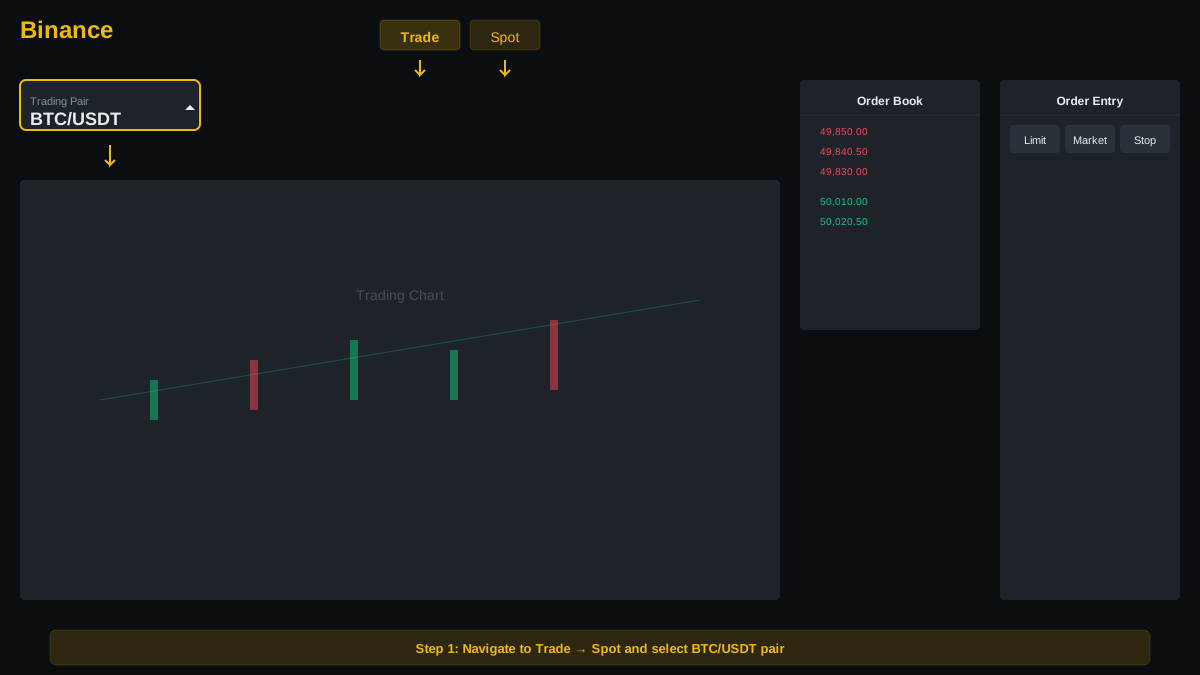
The Binance Spot trading interface. Select your trading pair from the top-left dropdown.
Note: This guide focuses on Spot trading. Futures trading uses similar mechanics but with leverage—higher risk, not recommended for beginners.
Step 2: Open the Order Panel
- On the right side of the screen, you'll see the order entry panel
- Click the Stop-Limit tab (despite the name, this is where you'll find all stop order types)
- Look for a dropdown that says "Stop-Limit"—click it and select Stop-Market
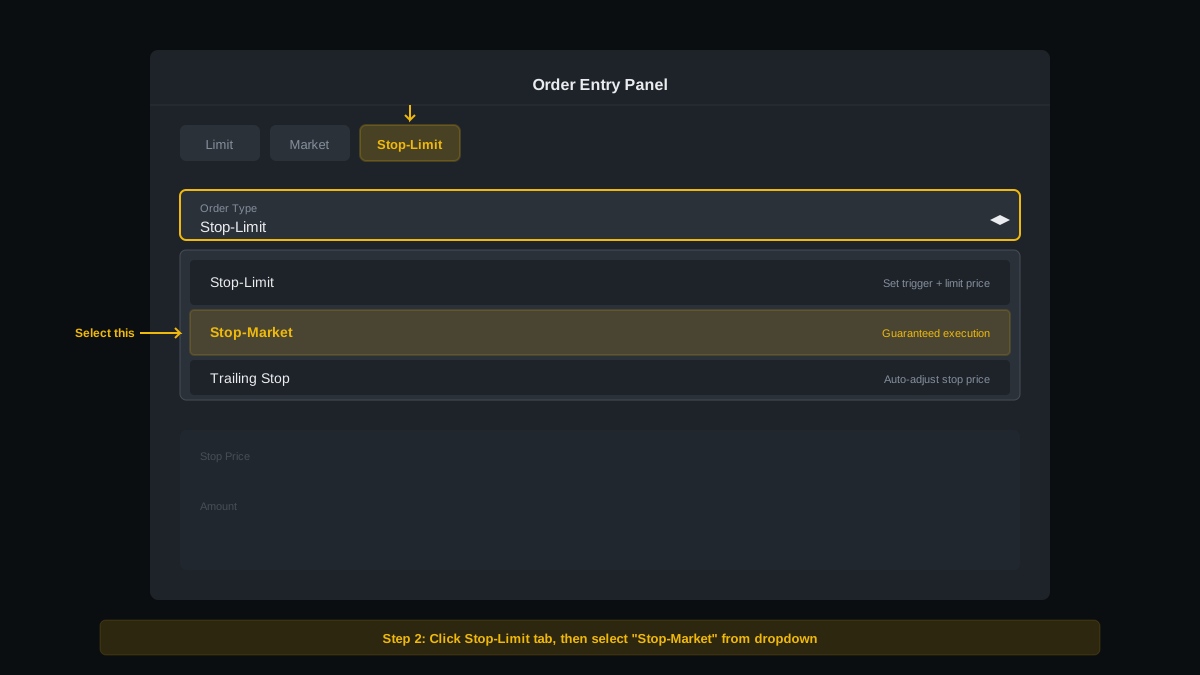
Click the Stop-Limit tab, then select "Stop-Market" from the dropdown menu.
Step 3: Configure Your Stop-Loss Order
Order Configuration Fields:
- Stop Price: The trigger price that activates your order
- Amount: How much of the asset to sell (usually 100% of your position)
Example scenario: You bought 0.1 BTC at $50,000. You want to limit losses to 5%.
- Calculate your stop price: $50,000 × 0.95 = $47,500
- Enter $47,500 in the "Stop" field
- Enter your position size: 0.1 BTC in the "Amount" field (or click "100%" to sell entire position)
- Review the estimated proceeds: Approximately $4,750 (minus fees)
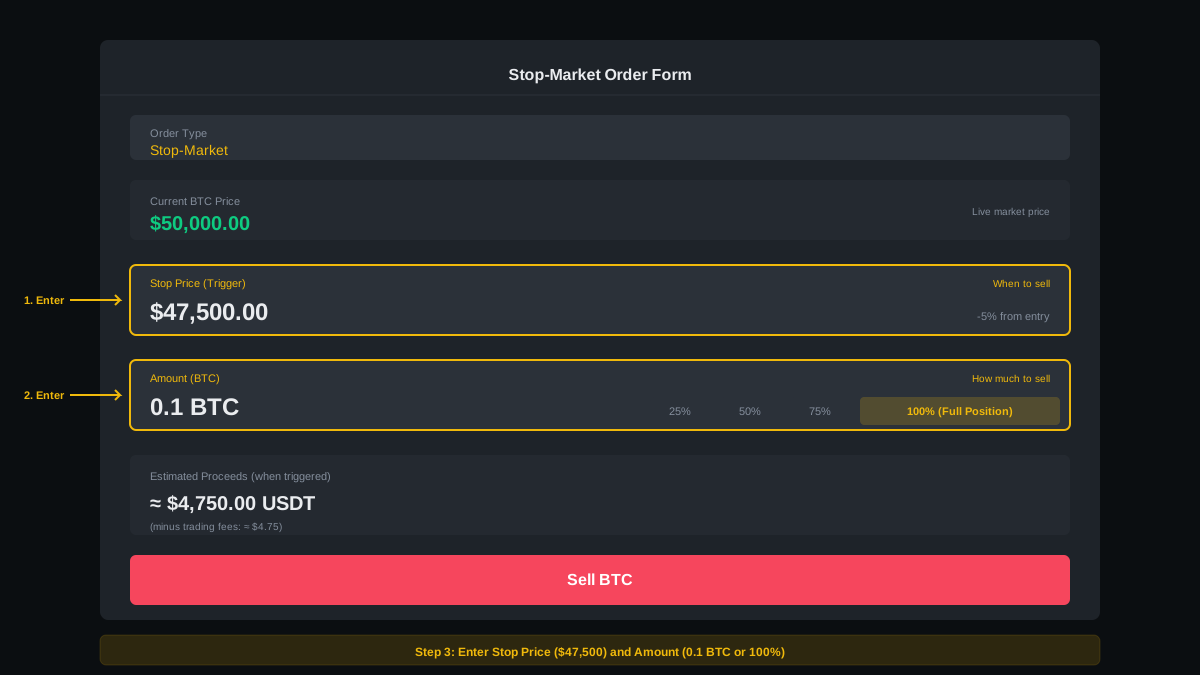
Stop-Market order form configured with Stop Price: $47,500 and Amount: 0.1 BTC.
Step 4: Place the Order
- Double-check your stop price—a typo can be costly!
- Click the red Sell button
- Confirm the order in the popup window
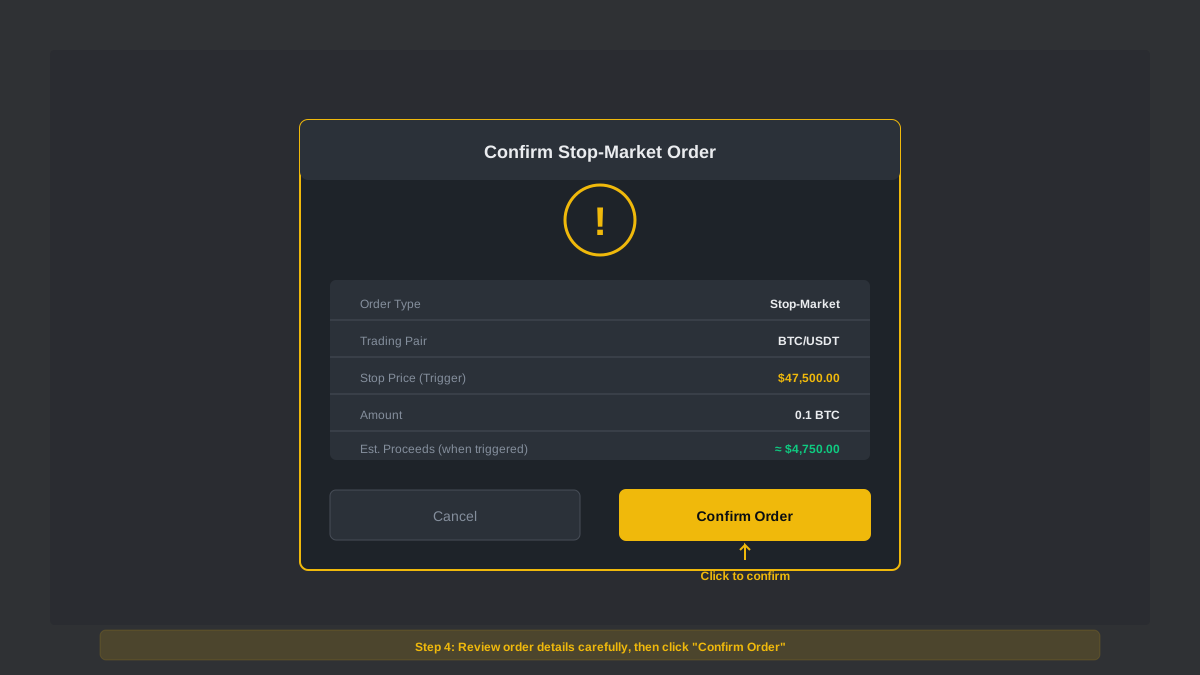
Review your order details carefully before confirming.
Your stop-loss is now active. You'll see it listed in the Open Orders section at the bottom of the screen.
Step 5: Monitor and Adjust (Optional)
Your stop-loss remains active until triggered or manually canceled. You can:
- Cancel: Right-click the order in "Open Orders" and select "Cancel"
- Modify: Cancel the existing order and create a new one with updated parameters (Binance doesn't support direct editing)
- Monitor: Watch the order status—when price approaches your stop, be ready for execution
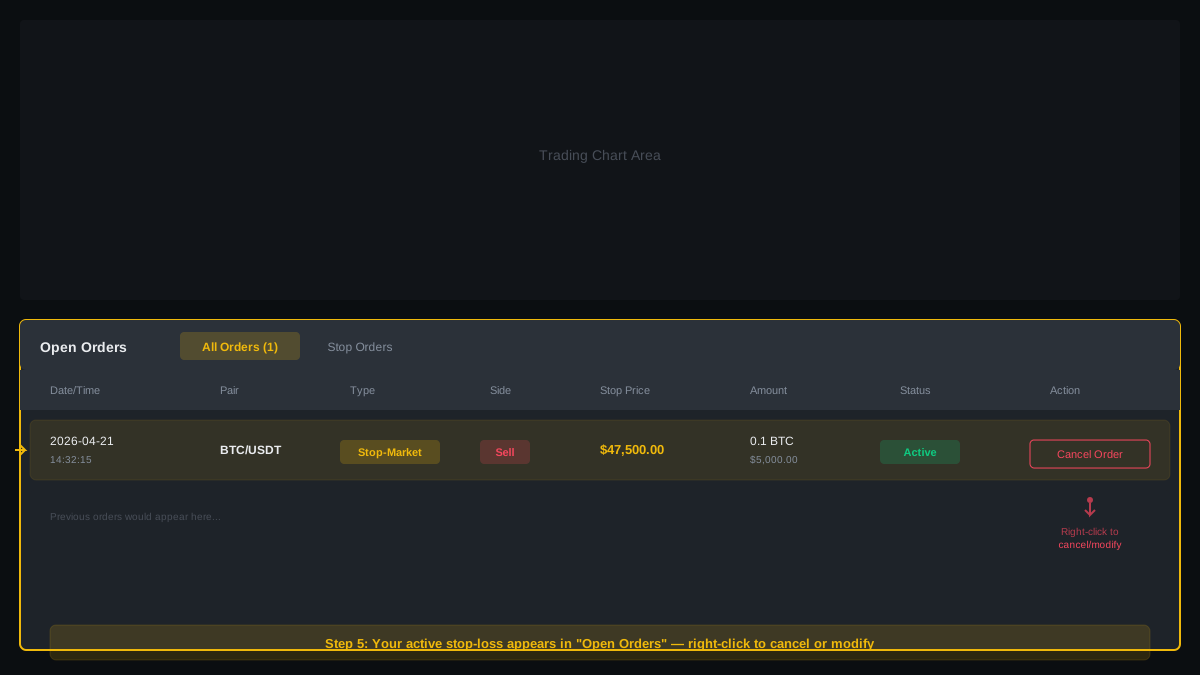
Your active stop-loss order appears in the "Open Orders" section. Right-click to cancel or modify.
📱 Mobile App Instructions
The Binance mobile app follows a similar flow: Navigate to Trade → Select your pair → Tap the order type selector → Choose Stop-Limit → Switch to Stop-Market → Enter your parameters → Tap Sell.
Stop-Limit vs. Stop-Market: Which Should You Use?
| Feature | Stop-Market | Stop-Limit |
|---|---|---|
| Execution guarantee | ✅ Always executes | ⚠️ May not execute if price gaps |
| Price control | ❌ No (market price) | ✅ Yes (specify minimum) |
| Slippage risk | Moderate | Low (but order might not fill) |
| Best for beginners | ✅ Yes | ⚠️ Requires more knowledge |
| Volatile markets | ✅ Recommended | ⚠️ Risky (may not fill) |
| Stable/liquid markets | ✅ Good | ✅ Excellent (better price control) |
Common Stop-Loss Mistakes to Avoid
1. Setting Stops Too Tight
The mistake: Placing your stop-loss just 1-2% below your entry price to "minimize risk."
Why it's bad: Normal market volatility ("noise") will trigger your stop constantly, locking in small losses before your trade has a chance to work. You'll death-by-a-thousand-cuts your account.
The fix: Use the asset's Average True Range (ATR) or recent volatility to set stops beyond normal price swings. For Bitcoin, 5-10% is often appropriate; for volatile altcoins, 10-15% may be needed.
2. Not Using Stops at All
The mistake: "I'll just watch the market and sell manually if it drops."
Why it's bad: Emotions, sleep, and life get in the way. You can't monitor charts 24/7. The one time you're offline is when the flash crash happens.
The fix: Always—ALWAYS—use stop-losses on every position. No exceptions. Treat it as trading hygiene, like brushing your teeth.
3. Moving Stops Lower to Avoid Losses
The mistake: Your position is down 8%, approaching your 10% stop. You move the stop to 15% to "give it more room."
Why it's bad: This is emotional trading disguised as flexibility. You're violating your risk management rules and hoping the trade will reverse—the same psychology that leads to catastrophic losses.
The fix: Set your stop once based on analysis, not emotion. Honor it. If you were wrong, take the loss and move on. Moving stops lower is forbidden except in specific planned strategies (like trailing stops that move up, not down).
4. Using Stop-Limit in Volatile Markets
The mistake: Setting a stop-limit order with stop at $45,000 and limit at $44,900 during a flash crash.
Why it's bad: Price drops from $46,000 to $44,500 in seconds, gapping right through your limit price. Your order never executes, and you watch the price fall to $40,000 while your "stop-loss" sits useless.
The fix: Use stop-market orders for protection. Accept minor slippage in exchange for guaranteed execution.
5. Forgetting About Fees
The mistake: Calculating risk/reward without accounting for trading fees.
Why it's bad: You plan a 1:2 risk/reward trade: risk $100 to make $200. But after entry fees, exit fees, and spread, you actually risked $110 to make $185. Your real risk/reward is worse than planned.
The fix: Factor fees into your calculations. On Binance, assume 0.1% per trade (0.2% round-trip) unless you have VIP status or hold BNB for discounts.
6. Ignoring Liquidity
The mistake: Setting stop-losses on low-volume altcoins without checking order book depth.
Why it's bad: When your stop triggers on a thin market, there might not be enough buyers. Your stop-market order could execute 5-10% below your stop price due to slippage.
The fix: Check the order book before trading illiquid assets. If the order book is thin, either accept the slippage risk or don't trade that asset. Stick to high-volume pairs (BTC, ETH, major altcoins) when starting out.
When to Use Stop-Loss vs. Take-Profit Orders
Stop-losses and take-profit orders work together as part of a complete trade plan. Here's how they differ and when to use each:
Stop-Loss Orders
Purpose: Limit losses by exiting losing positions automatically
When to use:
- On every single trade (non-negotiable)
- When you want to cap downside risk
- When you can't monitor the market actively
Take-Profit Orders
Purpose: Lock in gains by automatically selling when price reaches your target
When to use:
- When you have a specific price target based on technical analysis
- When you want to remove emotion from profit-taking
- When you're willing to cap your upside to ensure you don't give back gains
Using Both Together: The OCO Order
Binance supports OCO (One-Cancels-Other) orders, which combine a stop-loss and take-profit in a single order. When one triggers, the other automatically cancels.
Example OCO setup:
- Buy BTC at $50,000
- Set stop-loss at $47,500 (5% loss)
- Set take-profit at $55,000 (10% gain)
- 2:1 risk/reward ratio—if one in three trades wins, you're profitable
OCO orders are ideal for "set and forget" trades. You define your risk and reward upfront, then let the market decide which target gets hit first.
💡 Advanced Strategy: Scaling Out
Instead of using one take-profit order for your entire position, consider scaling out: Take 50% profit at your first target, move your stop-loss to breakeven, and let the remaining 50% run with a trailing stop. This locks in profits while maintaining upside exposure.
How to Calculate Stop-Loss Levels
Setting stop-losses randomly guarantees failure. Use these methods to calculate logical stop-loss levels:
1. Percentage-Based Stops (Simplest)
Risk a fixed percentage of your entry price—common for beginners.
Formula: Stop Price = Entry Price × (1 - Risk %)
Example: Entry at $50,000, 5% risk → Stop at $47,500
Pros: Simple, consistent, easy to calculate
Cons: Ignores market structure—may be too tight or too loose
2. Support/Resistance Levels (Most Common)
Place stops just below key support levels (for longs) or above resistance levels (for shorts).
Logic: If price breaks through support, the trend has changed—time to exit.
Example: Bitcoin has support at $48,000. You enter long at $50,000 and place your stop at $47,800 (just below support with a small buffer).
Pros: Respects market structure, gives trades room to breathe
Cons: Requires chart analysis skills
3. ATR-Based Stops (For Volatility)
Use the Average True Range (ATR) indicator to set stops based on recent volatility.
Logic: Volatile assets need wider stops; stable assets need tighter stops.
Formula: Stop Distance = ATR × Multiplier (typically 1.5-2x)
Example: Bitcoin's 14-day ATR is $2,000. Using a 2× multiplier, place your stop $4,000 below entry.
Pros: Adapts to market conditions automatically
Cons: Requires understanding of ATR indicator
4. Risk-Based Position Sizing (Professional Approach)
Start with your maximum dollar risk, then calculate position size and stop-loss together.
Formula:
Position Size = (Account Size × Risk %) / (Entry Price - Stop Price)
Example: $10,000 account, 2% risk ($200), entry at $50,000, stop at $47,500 → Position size = $200 / $2,500 = 0.08 BTC
This approach ensures you never risk more than your predetermined amount, regardless of where your technical stop-loss sits.
Next Steps: Master Your Trading Risk
Ready to level up your trading skills? These guides will help:
Final Thoughts: Stop-Losses Are Your Trading Insurance
Stop-loss orders are the difference between traders who survive long enough to become profitable and those who blow up their accounts in a single bad trade. They're not optional—they're the foundation of professional risk management.
The steps are simple: calculate your risk, determine your stop level, place the order, and honor it. What separates successful traders from the rest isn't finding winning trades—it's managing losing trades so they never become catastrophic.
Start today with small positions. Practice setting stop-losses on every trade. Track your results. Adjust your approach based on what the data tells you, not your emotions. Over time, disciplined risk management compounds into consistent profitability.
Remember: You don't need to win every trade to make money in crypto. You just need to ensure your winners are bigger than your losers—and stop-losses make that possible.
Last updated: March 2026. Trading strategies, platform features, and market conditions change frequently. Always verify current Binance features and practice with small amounts before risking significant capital.